
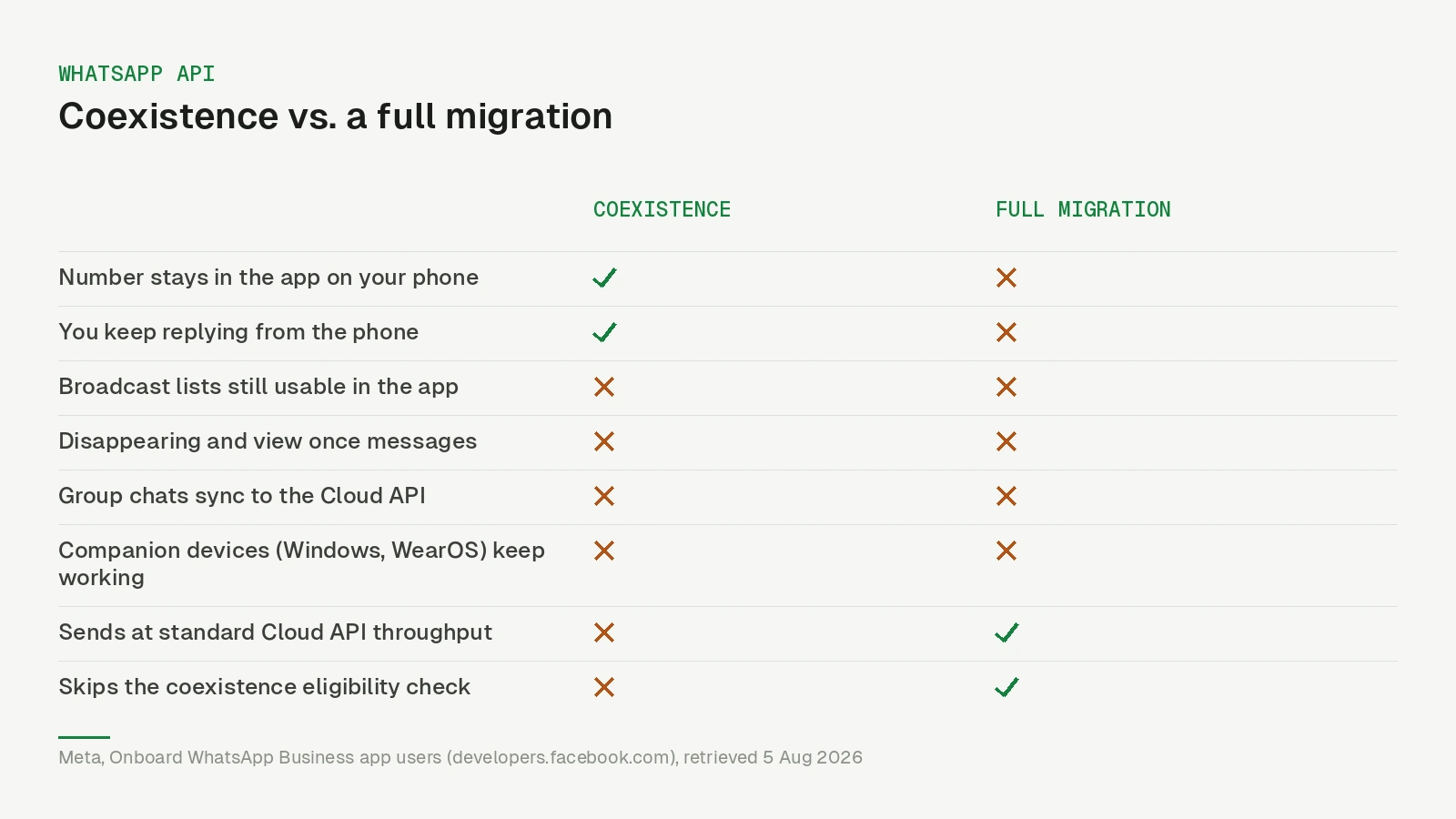
Coexistence lets one phone number run in the WhatsApp Business app and on the Cloud API at the same time. You keep replying by hand from your phone; a platform adds automations, broadcasts and a shared inbox on the same number; WhatsApp keeps the history in sync between the two. Meta’s documentation files it under onboarding WhatsApp Business app users.
That solves an old objection: the classic migration takes the number out of the app on your phone, a poor trade for an owner who answers half the messages personally.
The catch is that Coexistence is not a switch you flip. Meta decides whether your number qualifies, and it will refuse numbers without telling you why in any actionable detail.
What Meta requires before you start
Meta lists five requirements. Two concern the business itself, and both sit outside your control panel:
- The business must run WhatsApp Business app version 2.24.17 or higher.
- The onboarding must be run by a Solution Partner or Tech Provider — the mode is not available to a business connecting a number on its own.
The other three sit with the provider: Cloud API competence, a webhook endpoint that can digest the payloads, and Embedded Signup with session logging. Meta also requires the partner to subscribe to four additional webhook fields: account_update for lifecycle events on the shared account, history for past messages, smb_app_state_sync for contacts and their changes, and smb_message_echoes for new messages sent from the WhatsApp Business app.
That last one is the important one, and it is worth understanding as a buyer. smb_message_echoes is how the platform learns that you just answered someone from your phone. Without it, an AI agent sees only the customer’s incoming message, concludes nobody replied, and answers a second time.
So if you are evaluating a provider, ask whether they process message echoes. It is the difference between one voice in the chat and two.
What you give up on the phone
Meta lists the app features that change once a number is onboarded. None of them touch everyday messaging, but two catch people out.
| In the WhatsApp Business app | After Coexistence |
|---|---|
| Normal 1:1 chats, media, voice notes | Unchanged; editing and revoking messages now supported |
| Broadcast lists | Disabled; existing lists become read-only |
| Disappearing messages | Disabled |
| View once messages | Disabled |
| Live location | Disabled |
| Group chats | Not synchronised to the Cloud API |
| Linked companion devices | Unlinked at onboarding; Windows and WearOS unsupported afterwards |
Broadcast lists are the one to check before you commit. If your current process is a weekly broadcast to a hand-maintained list in the app, that habit ends here — you move it to template messages, which is a better process but a different one, with opt-in and approval rules attached.
There is also a throughput ceiling. Meta’s documentation is explicit: business phone numbers in use with both the app and the Cloud API “have a fixed throughput of 20 mps”. Twenty messages per second is plenty for conversations and small campaigns. It is a real constraint for a large one-shot broadcast.
What it costs
Nothing extra for the mode itself, and the split is clean.
Messages you send by hand from the WhatsApp Business app remain free. Messages sent through the Cloud API are billed at normal Cloud API pricing. Meta’s documentation adds a detail that matters for anyone modelling costs: messages sent from the app do not create or affect Cloud API conversation windows. Your manual replies do not quietly open a billable window, and they do not extend one either.
If you are budgeting, the thing to read next is not the Coexistence page but the pricing change of 1 October 2026. Since that date the free 24-hour service window is gone.
As of 1 November 2026, Meta’s pricing page bills Cloud API replies inside the window per message at the market’s service rate after a free tier of 1,000 delivered service messages per business phone number per month; utility templates inside the window are billed with no free tier, and without a payment method on the Messaging account Meta stops delivering service messages once the free tier is used. For Coexistence that sharpens the split: replies typed in the app stay free and do not count against the 1,000; replies sent from the platform do.
(Meta’s own Coexistence pricing explainer PDF still describes the older conversation-window model, as of 1 November 2026.) We covered that in the 2026 pricing changes and in how the 24-hour window actually works.
Why Meta refuses a number
This is the part no documentation prepares you for. You pick the Coexistence path, the Meta popup opens, you select your business — and it stops:
Your phone number isn’t eligible to connect to the WhatsApp Business Platform. More activity on the WhatsApp Business App is needed to help determine eligibility.
That is Meta’s documented wording for error code 3441045, which since this summer appears on the Embedded Signup errors page under business-app onboarding; the text we saw in our own onboardings differed only in phrasing. The same page documents the other refusals you can hit: the region is not supported (3441042), the number is already connected to another partner (3441049 — disconnect in the app and wait 15 minutes), a partner switch is not supported inside the flow (2655093 — disconnect in the app first), the account already uses Meta’s marketing messages product (3441047), or the app needs an update (4563015).
It is Meta’s judgement about your number, not your provider or setup; no configuration or support ticket moves it.
And Meta does not publish the threshold — no minimum age, message count or usage period for a number. Third-party help pages circulate specific numbers, commonly “seven days of activity”; we could not confirm any of them against Meta’s own material, so treat them as folklore rather than a rule you can plan around.
The wording points at activity, so a number with a real history as a business number likely stands a better chance than one registered last week. That is inference, not a rule — plan for a refusal rather than trying to engineer your way past it.
One related failure is documented. If the business previously worked with another partner and still shares that partner’s credit line, Meta returns an error when switching — a separate problem with a separate fix, but easy to mistake for the eligibility refusal.
If your number is refused, the fallback is a full migration onto the Cloud API on the same number; you give up the app on the phone. For a business that answers mostly from a desktop that is often the better trade anyway.
The 24-hour clock nobody mentions
If onboarding succeeds, a timer starts that has nothing to do with the customer service window.
Meta gives the partner 24 hours to synchronise the messaging history, “otherwise they must be offboarded and they must complete the flow again”. History arrives in three phases — day 0 to 1, day 1 to 90, then day 90 to 180 — covering up to 180 days, and media asset IDs are only provided for messages from the last 14 days.
Practically: do not start a Coexistence onboarding on your way out of the office. If the import does not run, the customer repeats the entire flow, QR code included.
Ask your provider whether they import history at all, and when they start — a sync requested days later has missed the window. Older attachments arrive as a note rather than the file, no matter who built the importer.
Getting out again
Offboarding is the customer’s, not the provider’s. In the WhatsApp Business app under Settings → Account → Business Platform, there is a Disconnect Account button. Meta then sends the partner an account_update webhook carrying the PARTNER_REMOVED event, optionally with a disconnection_info object describing the reason and whether a user or the system initiated it.
PARTNER_REMOVED is no longer the only way a connection dies, either. Meta disconnects on its own after roughly 14 days of inactivity on the primary phone or 30 days on a companion device, when the number moves to the consumer app, or when it changes — the webhook carries the reason. And a customer swapping phones, reinstalling the app or re-registering the number triggers ACCOUNT_OFFBOARDED, per Meta’s guide to reconnecting offboarded coexistence clients: Cloud API sending is suspended, and when they finish registering on the new device Meta shows them a pre-ticked opt-in for the connected platform. Unless they untick it, reconnection runs in the background and ACCOUNT_RECONNECTED arrives within minutes; the provider should pause sends in between, and WhatsApp Web and other companion devices have to be re-linked by hand.
A platform that ignores these events keeps showing the number as connected long after Meta cut the link, and every send fails against a dead token.
What changed on Meta’s side this autumn
Two changes alter the plumbing, not the trade-offs. First, Meta has split the WhatsApp Business account in two: a WhatsApp account that holds the phone number and a Messaging account that holds templates and billing. Per Meta’s account model page, the rollout began on 23 September 2026 and was due to reach all businesses by mid-October. For Coexistence, Meta converts the existing account into a “backward-compatible Messaging account” that keeps its ID and shares both accounts with the partner.
Second, Embedded Signup moved. According to Meta’s versions page, versions 2 and 3 were retired on 15 October 2026, and requests for them — or with no version at all — are now served as v4, where the platform still switches Coexistence on explicitly. Version 5, released on 20 October, has it on by default and reports back whether the onboarded number is also on the Business app (is_on_biz_app).
That matters together with the phone-number-first signup Meta began rolling out in July 2026: since the number is entered first, the flow now enters Coexistence on its own when the platform has Coexistence enabled and the number is already live in the Business app. Expect the choice to be made partly for you.
What this means for you
If you are choosing between Coexistence and a full migration, the decision comes down to four questions:
- Does someone answer customers by hand on a phone every day? If yes, Coexistence is worth the feature trade. If everything already happens on a desktop, migrate fully and skip the limits.
- Has the number been in real use in the WhatsApp Business app? If it is new, expect the eligibility refusal and plan for the migration path instead.
- Do you rely on broadcast lists in the app? That habit ends; budget the time to rebuild it as approved templates.
- Does your provider process message echoes,
PARTNER_REMOVEDand the offboarding events? Ask before you connect, not after your AI agent double-answers a customer. (Nybero handles echoes, history sync andPARTNER_REMOVED; the offboarded and reconnected events are logged but not yet acted on — we are saying so rather than claiming otherwise.)
Nybero supports both routes — you choose at connect time, and the choice is spelled out with its trade-offs rather than buried. You can see what the connected number gets on the features page, and what it costs on pricing. If you would rather ask a person first, message us on WhatsApp — which is, appropriately enough, a number running on the same platform this article is about.
Updated 1 October 2026. An earlier version stated that error 3441045 was undocumented; Meta’s Embedded Signup errors page now lists it, and the article has been corrected. The webhook requirements (now four fields including account_update), the system-initiated disconnection reasons, the device-swap reconnection flow and the October pricing change were updated against Meta’s onboarding documentation, retrieved 1 October 2026.
Updated 1 November 2026: added Meta’s new account model, the retirement of Embedded Signup v2/v3 and the v5 default for Coexistence, and a source for the device-swap flow; the error 3441047 description and the service-message rate wording were aligned with Meta’s documentation, retrieved 1 November 2026.