
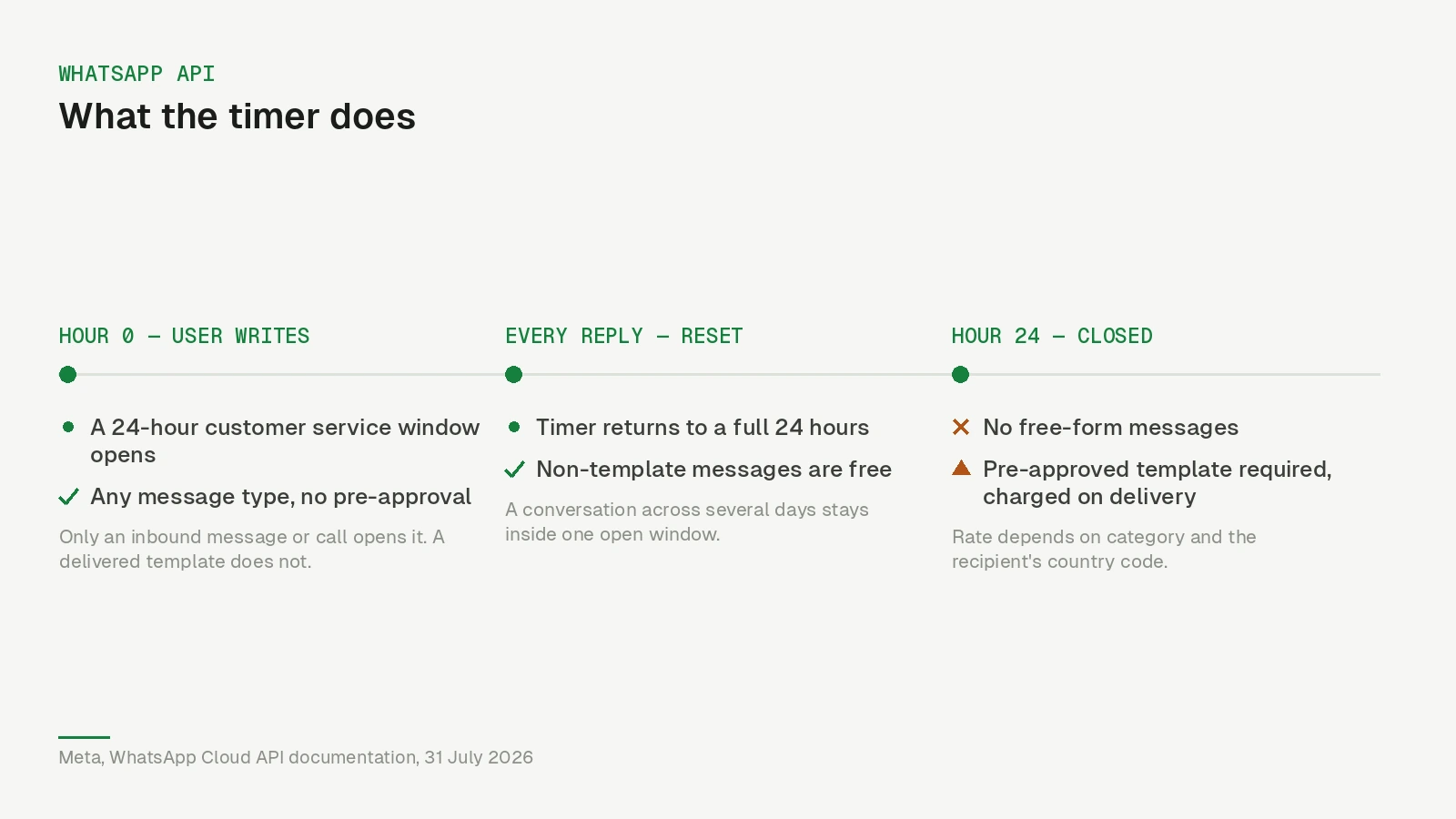
The customer service window is the single mechanic that decides what you can say on WhatsApp and what it costs. It is simple: when a user messages or calls your business, a 24-hour timer starts. While it runs, you can send whatever message type you like. When it expires, you can only send templates Meta approved in advance.
Meta’s own wording, from the Cloud API documentation: “When a WhatsApp user messages you or calls you, a 24-hour timer called a customer service window starts.” And when it ends: “When the window closes, you can only send pre-approved template messages.”
Everything else in this article follows from those two sentences.
What opens it, and what does not
The window opens on a user-initiated inbound event — a message, or a call. That is it.
It does not open when you send a template. It does not open when the template is delivered, or read. A person can read your message, screenshot it, forward it to a friend and never reply, and your window stays shut. Delivery is not engagement.
It resets on every new inbound message or call. So a support conversation that runs across three days is one window that keeps being renewed, not three windows.
Inside the window
While the timer runs you are in free-form territory. Text, images, documents, audio, video, interactive buttons and lists — none of it needs pre-approval, and you compose it as you go.
This is where actual conversation happens: answering a question, sending the invoice someone asked for, walking a customer through a return, letting an AI agent handle the back-and-forth at two in the morning. Free-form does not mean free, though — not since 1 October 2026.
What changed on 1 October 2026
Until 30 September 2026, non-template messages inside an open window were not charged. Since 1 October, per Meta’s pricing documentation (re-checked 1 November 2026), they are:
- Service messages (your free-form replies) are charged per delivered message at the market’s utility and authentication rate — in Germany €0.0456 — after a free allowance of 1,000 delivered service messages per business phone number per month. The allowance is shared across one-to-one and group chats, does not roll over, and there are no volume tiers for service messages.
- Utility templates sent inside an open window are charged at the utility rate too, with no free allowance. They had been free there since July 2025.
- Emoji reactions were announced as the one service message that stays free and does not count toward the 1,000. That wording now survives only on Meta’s archived pricing page; the current page does not repeat it, so check the webhook before relying on it.
- A payment method is now required. Meta’s wording: without one, it “will deliver service messages within the free tier but not deliver them after the free tier has been used”. If you onboarded through a partner and never added a card in Billing Hub, your replies stop being delivered at message 1,001.
The status webhook tells you which side of the line you are on: inside the tier a service message reports "type": "free_customer_service" and "billable": false; after it, "type": "regular" and "billable": true. Meta also notes that a message carries one charge only — a free-form reply with promotional content is billed as a service message, not additionally as marketing. Eligible governments and non-profits keep free service messages beyond the tier through 31 December 2027; since October their status webhooks mark those messages with "subtype": "paid_exempt".
The window itself works exactly as before. It is simply no longer free to be inside it.
The constraint on content has not changed either. The window is called a customer service window for a reason, and Meta’s Business Messaging Policy governs what you put in it. Answering the question someone asked is fine. Turning their support ticket into a promotion is how businesses lose their quality rating.
Outside the window
Once it closes, one door remains: an approved template.
Templates come in three categories and the category determines the price. Utility templates relate to an existing transaction — order updates, appointment reminders, delivery notifications. Authentication templates carry one-time codes. Marketing is everything promotional, and in every market on Meta’s EUR and USD rate cards it is the most expensive of the three (the separate authentication-international rate, which applies to some businesses in 18 markets, can be higher).
Since 1 July 2025, Meta charges per message rather than per conversation, and the charge lands when a message is delivered. Rates vary by category and by the recipient’s country code, and Meta may change them only on the first day of a quarter, with at least a month’s notice — several European markets moved onto standalone rate cards on 1 July 2026, and another round took effect on 1 October 2026 that left Germany, the rest of Western Europe, the UK and North America untouched (the details are here). As of 1 November 2026, Meta’s pricing page lists no rate-card change for 1 January 2027. Check the official pricing page for the current rate in the markets you actually message; anything quoted in a blog post, including this one, is a snapshot.
There is one useful exception. Conversations that start from a Click-to-WhatsApp ad — from the Android or iOS app; desktop and web do not count — can open a free entry point window. It opens the moment you reply inside the first 24 hours, Meta says it “may remain open for up to 7 days”, and every marketing, utility, authentication or service message inside it is free; only Meta Business Agent messages are still charged there. That has not changed on 1 October. If you run click-to-WhatsApp ads and answer promptly, that is up to a week of free messaging per person who clicks.
The economics, stated plainly
The cost of your WhatsApp programme is now roughly: number of times you have to reopen a closed conversation × the template rate in that market, plus in-window messages beyond 1,000 per number per month × the utility rate. Volume matters alongside reopenings, which it did not before October.
But the ratio still favours the window. In Germany a service message costs €0.0456 and a marketing template €0.1131 — two and a half times as much — and the first thousand replies a month cost nothing at all. Two businesses sending the same volume can still differ by a factor of several on the invoice, and the difference is almost never the rate they negotiated. It is how often they had to knock on a closed door.
Which leads to the part that is actually actionable.
Three habits that keep you inside the window
Answer fast enough to matter. The window is 24 hours; in our experience most of the value is in the first hour. A reply that arrives in ten minutes gets a response, and that response resets the timer. A reply that arrives the next morning arrives to a closed window and costs you a template to reopen. If you cannot staff the evening, an AI agent that handles the first response is not a luxury — it is the thing that keeps the window open.
End messages with a reason to reply. Not “let us know if you need anything”, which nobody answers. A question, or two buttons. Every reply is another 24 hours.
Batch what you were going to send anyway. If you know you owe someone three things, and the window is open, send them now rather than as three separate templates over the next week.
A fourth, less obvious one: watch the end of the window rather than the start. A message sent at hour 23 is a service message — free inside your monthly thousand, then the utility rate. The same message at hour 25 needs a template, and if it is a marketing template it costs several times more. Any decent platform will at least show you whether a window is still open.
Where people get caught out
Assuming a delivered template opens the window. It does not. This is the single most common misunderstanding, and it produces sequences where every step is billed because none of them ever got a reply.
Treating the window as permission. It is a technical capability, not consent. Someone who messaged you about a delayed order has not agreed to your Black Friday campaign. Under the GDPR and e-privacy rules — and under Meta’s own policy — you need a separate opt-in for marketing, and what that opt-in has to look like is a topic of its own.
Sending a marketing template where a utility one would do. Categories are Meta’s call, not yours, and a promotional line inside an “order update” gets the template rejected or reclassified. But it works in the other direction too: a genuine appointment reminder is a utility template, and businesses routinely pay marketing rates for it because someone wrote it like an advert.
Ignoring the free entry point. If you already run click-to-WhatsApp ads, you have free windows of up to a week arriving daily and probably no follow-up designed for them.
Having no payment method on file. New since October: replies beyond the free tier are simply not delivered. The chat shows nothing; the webhook does.
What this means for you
Look at your last month of WhatsApp spending and split it in two: templates sent because there was genuinely no open window, and templates sent because nobody replied in time. The second number is the one you can fix, and it is usually the larger one.
Then fix it in this order — response time first, reply-inviting endings second, template category audit third. In Nybero this is visible directly in the inbox: conversations show whether their window is open, automations never swap a free-form step for a paid template behind your back — if the window has closed, the step stops and tells you why — and the AI agent answers at the hours when nobody is at a desk. That is the whole trick. Stay in the conversation — it is still the cheapest message you can send, and for the first thousand a month it is free.
Updated 1 October 2026: the window became chargeable on this date; the section on what changed, the 1,000-message free tier, the payment-method rule and the free entry point duration (up to 7 days, previously stated as 72 hours) were added or corrected against Meta’s pricing documentation, last re-checked 1 October 2026. Rates change; that page is the source of truth.
Updated 1 November 2026: re-checked against Meta’s pricing, groups pricing and send-messages documentation. The free entry point is now described for Click-to-WhatsApp ads only, because Meta’s current pricing page no longer names Facebook Page call-to-actions; the emoji-reaction exemption is marked as stated only on Meta’s archived pricing page; the payment-method quote was aligned with Meta’s current wording.