
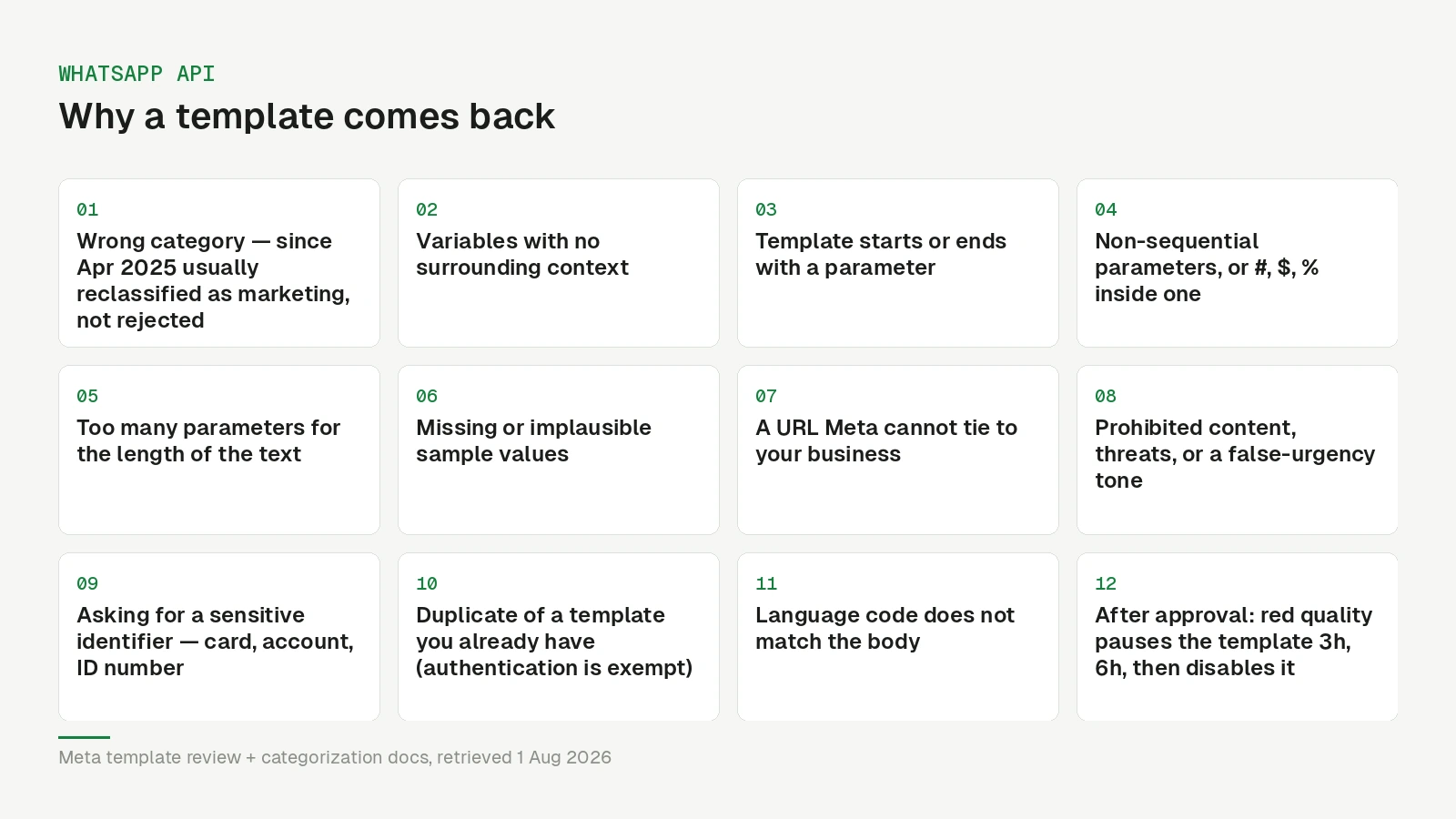
A rejected template is almost never a mystery. Meta’s review looks for a short list of specific problems, and once you know the list you can usually spot the cause in your own text before you open the Manager.
One thing has changed since most guides on this were written, and it matters more than any single rejection reason: a wrong category usually does not come back as a rejection any more. It comes back as a higher bill.
The category rule that changed
Templates are marketing, utility or authentication, and Meta validates the category when you create the template — based on what the message actually says, not on what you selected.
Since 9 April 2025, a utility template that Meta judges to be promotional is approved as marketing rather than rejected. The template stays approved and sendable; you simply pay the marketing rate from then on. Content that is unclear — a body of only {{1}}, or just “Congratulations!” — is treated as marketing too.
Approval does not settle it. Meta keeps re-checking approved templates, including ones a category review already confirmed, and switches a utility template to marketing after a day’s notice — instantly, since 16 April 2025, for businesses it has already warned. A template Meta decides is really authentication runs until the first of the following month, then flips to rejected; at creation, other mismatches can still come back as INCORRECT_CATEGORY.
So the classic mistake — a real appointment reminder with one promotional sentence bolted on, “See you Thursday at 14:00. And don’t forget our summer offer!” — no longer produces an error you would notice. It produces a permanent surcharge on every send, because in most markets marketing is the most expensive category. If you disagree with a reclassification, you can request a category review within 60 days.
Repeated miscategorisation has its own penalties. As of 1 November 2026, Meta’s categorization rules escalate from a warning to a capped utility volume, then to a block of seven days or more in which every utility template becomes marketing and no new one can be created.
The fix is to split it. The reminder is a utility template. The offer is a separate marketing template to people who consented to marketing.
Formatting: the rejections you actually still get
These are judged mechanically, which makes them the easiest to prevent.
Dangling variables. Meta’s rule is explicit: a template cannot start or end with a parameter. {{1}}, your table is booked. and Your code is {{1}} both fail. Put words on both sides.
Variables without context. Meta’s list of common rejection reasons does not name this, but the sample rejection in its status webhook reference is exactly this case: {{1}}{{2}} with no text or punctuation between them, with the advice to separate parameters with descriptive text. Hello {{1}}, your order {{2}} was shipped on {{3}}. shows what shape of data goes in — to the reviewer, and to you six months later.
Too many parameters for the length. Meta rejects templates whose parameter count is high relative to the amount of fixed text. A three-word message with two variables reads as a blank form.
Non-sequential parameters. {{1}} then {{3}} fails. Number them in order.
Special characters inside parameters. #, $ and % in a parameter are a rejection reason, as are missing or mismatched curly braces.
Missing samples. Every variable needs a sample at submission, and an appeal needs one too; a template without them will not pass.
If you prefer readable placeholders, Meta also supports named parameters — {{first_name}}, lowercase with underscores, each name unique within the template.
The failure that is not a rejection at all
The subtler variable problem bites at send time rather than review time. If a variable resolves to an empty string because the contact has no first name, the API refuses the send, not the template — Meta’s documentation does not spell this out, but that is what we see in production. It looks like a delivery failure and gets debugged in the wrong place for a day.
So decide what an empty field means before it happens. Never substitute the phone number and never the sample value — both have shipped to real customers at other companies, and both look exactly as bad as they sound.
URLs and buttons
Meta wants a URL it can associate with the business behind the account. Meta does not publish a URL rule, but in practice your own domain passes, while shorteners, raw IP addresses and domains unrelated to your business are a frequent trigger.
If you need per-contact links — a personalised booking page, a unique voucher — WhatsApp only allows a variable in the URL suffix, so the base has to be a fixed path on your domain with the variable part appended. If that shape does not fit your links, a signed redirect behind a fixed, reviewable base URL does, and it is invisible to the recipient.
Content that is simply not allowed
Meta’s WhatsApp Business Messaging Policy — which since 23 September 2026 also absorbs the former Commerce Policy — excludes a set of verticals, among them firearms, alcohol and tobacco, drugs, medical and healthcare products, real-money gambling and gaming, adult products, dating, multi-level marketing, payday loans and debt collection, and currencies including ICOs and binary options. Narrow country lists allow alcohol, over-the-counter drugs and online gambling in some markets; the rest is excluded everywhere.
Two more that catch legitimate businesses. Meta explicitly prohibits requesting sensitive identifiers: full card or account numbers, ID numbers (partial identifiers such as the last four digits are allowed). And it prohibits abusive or threatening content, including threatening a customer with legal action or publicly shaming them — which quietly rules out the dunning template someone in finance will eventually ask you to build.
There is also a tone rule people underestimate. Templates that create false urgency, imply an account problem that does not exist, or read like phishing get rejected even when the business is legitimate. “Your account will be closed — click here” is a rejection whether or not it is true.
Duplicates
Submitting a template with the same body and footer wording as an existing one gets rejected as a duplicate — Meta compares content, not names — and a resubmission that barely changes anything tends to earn the same manual verdict for the same reason it was rejected the first time. The exception is authentication templates, which are exempt from the duplicate check.
If a template was rejected, edit that template or appeal it. Do not clone it.
Reading the rejection, and what to do next
The Manager gives you a reason code, and the codes are broad. The status webhook reference lists eight, each with a one-line meaning as of 1 November 2026: INVALID_FORMAT is format; ABUSIVE_CONTENT, PROMOTIONAL and SCAM all mean content that violates policy (and sound more alarming than they usually are); INCORRECT_CATEGORY and TAG_CONTENT_MISMATCH mean content that does not match the category; CATEGORY_NOT_AVAILABLE is deprecated; NONE turns up on events that are not rejections, such as a pause. For INVALID_FORMAT, the webhook also carries a rejection_info object with a plain-language reason and a recommendation — read it before you guess.
The reason narrows it to a class. The specific fix is still in your wording, and the fastest way to find it is to read your own template as a stranger who did not ask for it.
Then use the right door. Appeal in the WhatsApp Manager if you think the decision is wrong — Meta decides appeals within 24 hours and asks for a sample. Edit and resubmit the same template if it clearly needs changing. Submitting a fresh near-identical template is the one move that reliably makes things worse.
After approval: quality, pausing, pacing
Every template carries a quality signal derived from how recipients react — negative feedback such as blocks and reports, and low read rates. Templates sit at quality pending, then high, medium or low. When quality drops to red, Meta pauses the template: three hours the first time, six the second, and disables it on the third. Attempts to send a paused template are refused by the API and not charged.
Newly created marketing templates — and utility templates, if one of yours was recently paused — may also be paced, released gradually while early reactions are measured. Separately, Meta has been rolling out business portfolio pacing since December 2025: large sends from portfolios with fewer than 500,000 template messages in the past 365 days go out in batches, with later messages held while feedback comes in.
One more thing to know before you delete anything: deleting an approved template locks its name for 30 days, and deleting by name removes every language variant. If you need the name back sooner, you need a new one.
The practical consequence: a template can pass review and still stop working a week later. If sends suddenly dry up, check template status before you check your code.
Before you resubmit
- Does every sentence belong to the category you chose? Remove the one that does not — otherwise you are choosing to pay the marketing rate.
- Does every variable have words on both sides, sequential numbering, and no
#,$or%inside it? - Is there a plausible sample for every variable, and is the parameter count sensible for the length?
- What happens if a variable is empty for a real contact? Where is that handled?
- Does every URL point at a domain Meta can associate with your business?
- Are you asking for anything Meta treats as a sensitive identifier, or threatening a consequence?
- Would this message look legitimate to someone who forgot they opted in?
- Does an equivalent template already exist under a different name?
- Does the language code match the body?
What this means for you
Rejections are cheap to prevent and expensive to iterate on, because each round costs a review cycle and, in a launch week, a day. The two changes with the highest return are splitting mixed-purpose templates, which is now a cost decision rather than a rejection risk, and deciding in advance what an empty variable becomes.
Nybero helps with both: the utility editor reminds you that promotional content does not belong there and flags a template Meta has reclassified, contacts whose field is empty are skipped before the send instead of leaking a sample value or a phone number, and per-contact links are generated through a signed redirect behind a fixed base URL so the button passes review. If a name is locked after a deletion, the submit returns a free _v2-style name instead of a cryptic error. One house convention worth stealing, though Meta does not require it and in fact expects one name across languages: we put the language in the template name (reminder_24h_de, reminder_24h_en) and always look templates up by ID, because two entries that look alike in a list are how the Spanish variant reaches a German customer.
If sends are failing rather than templates, our piece on the 24-hour window covers the other common cause — and note that since 1 October 2026 utility messages sent inside an open window are billed too, and service replies beyond 1,000 a month per number as well. The category question is now purely a rate difference — in Germany €0.1131 for marketing against €0.0456 for utility — rather than paid versus free, which changes the category maths.
Updated 1 November 2026: reason-code meanings, rejection_info, miscategorisation penalties, re-checks after approval, portfolio pacing and the policy’s country exceptions, checked against Meta’s template and webhook documentation and the Business Messaging Policy, retrieved 1 November 2026. An earlier version said Meta does not document the reason codes and counted PROMOTIONAL as a category problem; Meta defines it as a policy violation. The note below called adjacent placeholders no rejection reason; Meta’s own sample INVALID_FORMAT rejection is now that case.
Updated 1 October 2026: policy consolidation of 23 September 2026, full reason-code list, edit limits, name lock after deletion and the October pricing change added. Checked against Meta’s template review documentation and template categorization rules, and the WhatsApp Business Messaging Policy, retrieved 1 October 2026. An earlier version stated that a wrong category is usually rejected, that adjacent placeholders are a rejection reason, and that a pending template should be resubmitted as a fresh one; all three were wrong. Meta revises these policies regularly.